Test Agent Skills
Skills are local instructions that teach an agent when and how to use a capability. When you have two versions of the same skill, you usually want to know two things:
- Does the agent use the skill when the task calls for it?
- Does that skill version lead to better work?
Promptfoo can answer both questions by running the same tasks against each version side by side. Keep the model, task files, and permissions the same, swap only the SKILL.md, and compare the results.
For a bundle with neighboring skills, add one more question:
- Does the agent avoid the nearby skill when the task belongs somewhere else?
Start With One Comparison
In this example, we're comparing two versions of a review-standards skill. Each version gets its own fixture directory with the same source file and a different copy of the skill:
skill-eval/
├── promptfooconfig.yaml
└── fixtures/
    ├── v1/
    │   ├── .claude/skills/review-standards/SKILL.md
    │   └── src/auth.ts
    └── v2/
        ├── .claude/skills/review-standards/SKILL.md
        └── src/auth.ts
For Codex or OpenCode, use .agents/skills/review-standards/SKILL.md instead of .claude/skills/.... The rest of the comparison can stay the same.
Compare Two Claude Skill Versions
We'll start with the Claude Agent SDK provider. The prompt asks for a short JSON review so the outputs are easy to score, and the two providers differ only in working_dir:
description: Compare Claude skill versions

prompts:
  - '{{request}}'

# YAML anchor for the schema both providers enforce. The Claude Agent SDK's
# `output_format` is the equivalent of Codex's `output_schema` — it returns
# valid JSON without you having to ask for "JSON only" in the prompt or
# strip Markdown fences from the model's reply.
x-review-schema: &reviewSchema
  type: json_schema
  schema:
    type: object
    required: [summary, issues]
    additionalProperties: false
    properties:
      summary: { type: string }
      issues:
        type: array
        items:
          type: object
          required: [id, severity]
          additionalProperties: false
          properties:
            id: { type: string }
            severity: { type: string, enum: [high, medium, low] }

providers:
  - id: anthropic:claude-agent-sdk
    label: review-standards-v1
    config:
      model: claude-sonnet-5
      working_dir: ./fixtures/v1
      setting_sources: ['project']
      skills: ['review-standards']
      append_allowed_tools: ['Read', 'Grep', 'Glob']
      output_format: *reviewSchema

  - id: anthropic:claude-agent-sdk
    label: review-standards-v2
    config:
      model: claude-sonnet-5
      working_dir: ./fixtures/v2
      setting_sources: ['project']
      skills: ['review-standards']
      append_allowed_tools: ['Read', 'Grep', 'Glob']
      output_format: *reviewSchema
setting_sources: ['project'] discovers SKILL.md files under .claude/skills/. The skills: filter (added in @anthropic-ai/claude-agent-sdk 0.2.120) narrows the session to a single skill and auto-allows the Skill tool, so it no longer needs to appear in append_allowed_tools. Pass skills: 'all' if you want every discovered skill enabled. On older SDK versions, drop skills: and add 'Skill' back to append_allowed_tools.
Without output_format, Claude usually wraps short JSON answers in Markdown fences or a leading sentence, which makes downstream JSON.parse() brittle. Setting it on both providers — once via the &reviewSchema anchor — gives you reliable structured output without prompt gymnastics.
Because everything else is held constant, any meaningful difference in the results should come from the skill text itself.
Next, add a few tasks that represent how the skill will really be used:
defaultTest:
  # By default, Promptfoo fans each YAML-list var into one test case per
  # element (matrix expansion), which would split each comparison test in
  # two. Disable that here so `expectedIssues` reaches the assertion intact.
  options:
    disableVarExpansion: true

tests:
  - description: Finds both auth issues
    vars:
      request: Review src/auth.ts for password handling and token comparison issues.
      expectedIssues:
        - weak-password-hash
        - timing-unsafe-compare

  - description: Focuses on password handling only
    vars:
      request: Review src/auth.ts only for password handling issues.
      expectedIssues:
        - weak-password-hash
The first case asks for a broad review covering both topics. The second is narrower, which helps catch a skill that finds the right problems but ignores the user's requested scope. Pairing the two together is what lets the eval reward a skill version that both knows the full set of issues and respects the user's scope when asked.
See Passing Arrays to Assertions for the matrix-expansion behavior disableVarExpansion opts out of.
Add Assertions
Assertions tell Promptfoo what "better" means for this comparison. It helps to add them one layer at a time.
Check That the Skill Was Used
Start by verifying that Claude actually invoked the skill:
defaultTest:
  assert:
    - type: skill-used
      value: review-standards
Claude exposes Skill tool calls directly, and Promptfoo normalizes them into the skill-used assertion. This distinguishes a good answer that happened without the skill from one that was produced through the workflow you intended to test.
Score the Output
Then score whether the review found the expected issues:
defaultTest:
  assert:
    - type: javascript
      threshold: 0.7
      value: |
        const result = typeof output === 'string' ? JSON.parse(output) : output;
        const expected = context.vars.expectedIssues;
        const found = (result.issues || []).map((issue) => issue.id);
        const hits = expected.filter((id) => found.includes(id));
        const recall = hits.length / expected.length;

        return {
          pass: recall >= 0.75,
          score: recall,
          reason: `matched ${hits.length}/${expected.length} expected issues`,
        };
The JavaScript assertion gives each response a score based on issue recall. In your own eval, replace this with the signal that matters for the skill: tests passed, required edits were made, policy checks were followed, or a rubric was satisfied.
Add Secondary Signals
Once correctness is working, you can add supporting signals:
defaultTest:
  assert:
    - type: cost
      threshold: 0.50
    - type: latency
      threshold: 120000
These checks are useful when two skill versions are both correct but one is much more expensive or slower.
If you want Promptfoo to mark the strongest output for each test case, add max-score:
defaultTest:
  assert:
    - type: max-score
      value:
        method: average
        threshold: 0.7
        weights:
          javascript: 4
          skill-used: 2
          cost: 0.5
          latency: 0.5
That weighting makes task quality the main signal, while still rewarding the version that routes correctly and stays within practical limits.
Use the Same Eval With Codex
To run the same comparison with OpenAI Codex SDK, keep the tests and scoring logic, then use Codex's bare output_schema shape with the provider block:
x-review-schema: &reviewSchema
  type: object
  required: [summary, issues]
  additionalProperties: false
  properties:
    summary: { type: string }
    issues:
      type: array
      items:
        type: object
        required: [id, severity]
        additionalProperties: false
        properties:
          id: { type: string }
          severity: { type: string, enum: [high, medium, low] }

providers:
  - id: openai:codex-sdk
    label: review-standards-v1
    config:
      model: gpt-5.5
      working_dir: ./fixtures/v1
      skip_git_repo_check: true
      sandbox_mode: read-only
      enable_streaming: true
      output_schema: *reviewSchema
      cli_env:
        CODEX_HOME: ./codex-home

  - id: openai:codex-sdk
    label: review-standards-v2
    config:
      model: gpt-5.5
      working_dir: ./fixtures/v2
      skip_git_repo_check: true
      sandbox_mode: read-only
      enable_streaming: true
      output_schema: *reviewSchema
      cli_env:
        CODEX_HOME: ./codex-home
Codex discovers project skills from .agents/skills/ under each working_dir. Its skill-used signal is inferred from successful reads of the matching SKILL.md, so keep enable_streaming: true while developing the eval if you want Promptfoo to collect that evidence. The earlier JavaScript assertion should use JSON.parse(output) with Codex because output_schema keeps output as a JSON string rather than a parsed object.
For managed security workflows rather than general local skills, use the Codex Security SDK provider. It runs native standard, deep, and diff scans plus finding validation, and returns structured findings, coverage, token usage, and estimated scan cost.
The runnable skill-comparison example uses the same approach, with a YAML anchor to share the schema between v1 and v2.
There is a matching Claude example that uses output_format and the skills: filter so you can run the same comparison against either provider.
Use the Same Eval With OpenCode
To run the same comparison with OpenCode SDK, keep
the tests and scoring logic, then enable OpenCode's native skill tool and use
its format option for JSON Schema output:
x-review-json-schema: &reviewJsonSchema
  type: object
  required: [summary, issues]
  additionalProperties: false
  properties:
    summary: { type: string }
    issues:
      type: array
      items:
        type: object
        required: [id, severity]
        additionalProperties: false
        properties:
          id: { type: string }
          severity: { type: string, enum: [high, medium, low] }

providers:
  - id: opencode:sdk
    label: review-standards-v1
    config:
      provider_id: anthropic
      model: claude-sonnet-5
      working_dir: ./fixtures/v1
      tools:
        read: true
        grep: true
        glob: true
        list: true
        skill: true
      permission:
        skill: allow
      format:
        type: json_schema
        schema: *reviewJsonSchema

  - id: opencode:sdk
    label: review-standards-v2
    config:
      provider_id: anthropic
      model: claude-sonnet-5
      working_dir: ./fixtures/v2
      tools:
        read: true
        grep: true
        glob: true
        list: true
        skill: true
      permission:
        skill: allow
      format:
        type: json_schema
        schema: *reviewJsonSchema
OpenCode discovers .agents/skills/ directories in the working-directory
hierarchy, then loads the matching skill through its native skill tool.
Promptfoo normalizes those tool calls into
skill-used,
so the same routing assertion works without a provider-specific heuristic.
OpenCode's structured output reaches Promptfoo as JSON text, which the shared
JavaScript assertion above already handles.
Add Trace Evidence When Needed
For Claude Agent SDK and OpenCode SDK, skill-used is usually enough to prove invocation because it is based on first-class skill tool calls. If you need Claude's raw call details, inspect the recorded tool calls directly:
assert:
  - type: javascript
    value: |
      const calls = context.providerResponse?.metadata?.toolCalls || [];
      return calls.some((call) => call.name === 'Skill');
For Codex SDK, trace evidence can be useful when you want to see the workflow behind the final answer. Enable tracing and assert that Codex read the skill file:
providers:
  - id: openai:codex-sdk
    config:
      model: gpt-5.5
      working_dir: ./fixtures/v2
      skip_git_repo_check: true
      sandbox_mode: read-only
      enable_streaming: true
      deep_tracing: true

tracing:
  enabled: true

tests:
  - assert:
      - type: trajectory:step-count
        value:
          type: command
          pattern: '*review-standards/SKILL.md*'
          min: 1
Use Codex app-server when you need to test app-server-specific behavior such as explicit skill input items, approvals, or plugin metadata rather than just the skill outcome.
Run the Eval
Run the config the same way you would any other Promptfoo eval:
npx promptfoo@latest eval -c promptfooconfig.yaml
From there, add only the options that help answer your current question:
- Add
--repeat 3when you want a better sample of nondeterministic agent behavior. - Add
--no-cachewhile iterating on the skill text and you want fresh runs. - Add
-o results.jsonwhen you want to inspect or compare results outside the terminal. - Run
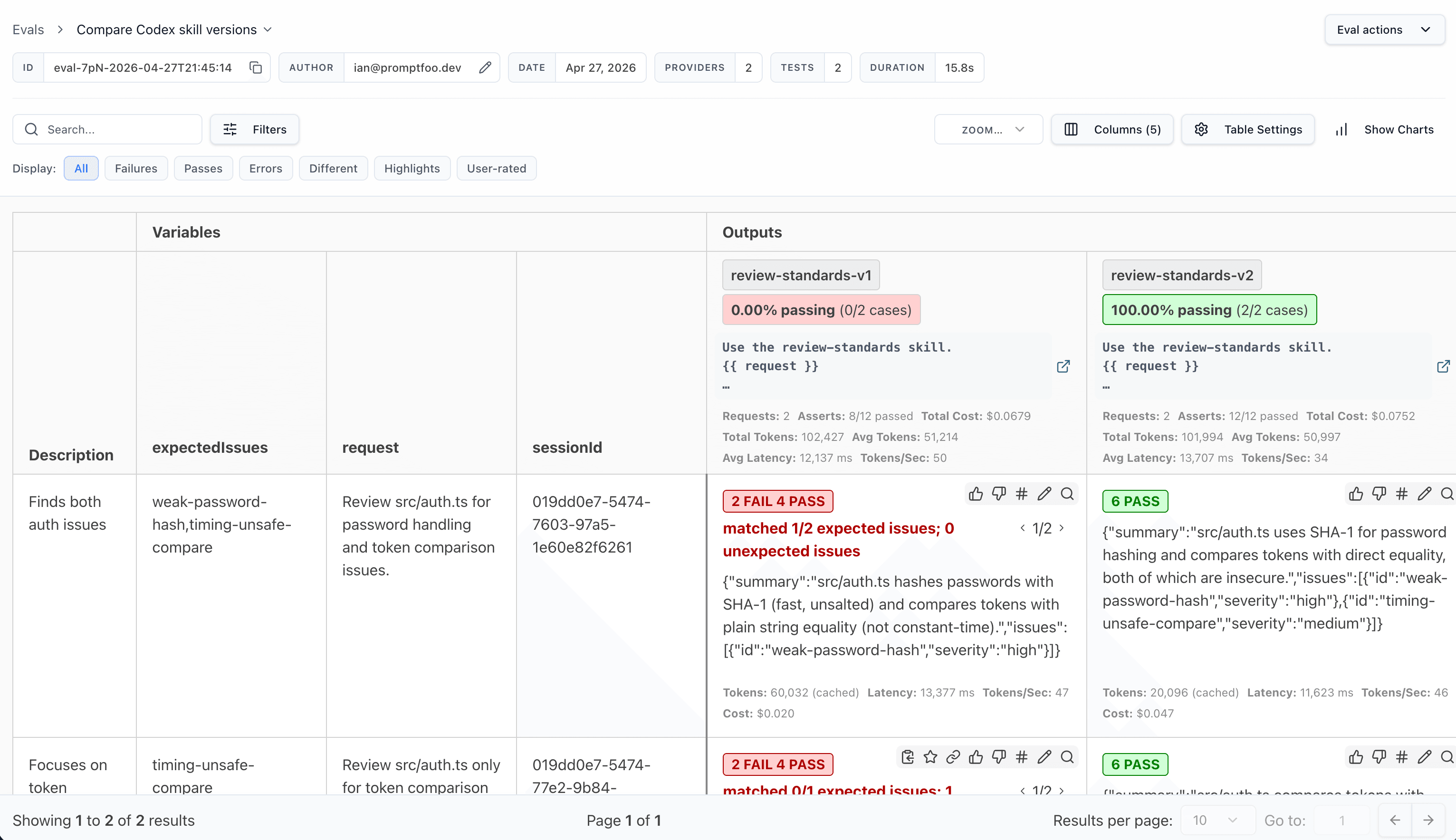
npx promptfoo@latest viewwhen the side-by-side web view is more useful than the CLI table.
In the web view, the comparison is easy to inspect side by side:
Decide Which Skill Wins
Start with the comparison that matters most for the skill. For a review skill, that might be "which version finds the right issues with the least noise?" For a code-writing skill, it might be "which version passes the tests most often?"
Then use supporting checks where they add value:
# Did the agent use the intended skill?
- type: skill-used
  value: review-standards

# Did the output stay within a reasonable budget?
- type: cost
  threshold: 0.50

# Was the answer fast enough for the workflow?
- type: latency
  threshold: 120000
If two versions are close, rerun the eval with repeats and inspect the failures before choosing one. The better skill is the one that holds up across the tasks you care about, not the one that wins a single lucky run.
Test Routing Boundaries In Bundles
For a bundle, do not test only the happy-path prompt for each skill. Add nearby prompts that should route to a sibling instead, then assert both the skill you want and the skills you do not want:
tests:
  - description: Eval authoring stays out of provider setup
    vars:
      request: Write a regression eval for this existing provider.
    assert:
      - type: skill-used
        value: promptfoo-evals
      - type: not-skill-used
        value: promptfoo-provider-setup

  - description: Provider wiring does not become eval authoring
    vars:
      request: Connect this HTTP endpoint and verify one safe smoke call.
    assert:
      - type: skill-used
        value: promptfoo-provider-setup
      - type: not-skill-used
        value: promptfoo-evals
The useful bundle eval has three layers:
- Positive prompts that should trigger each skill.
- Near-miss prompts that should trigger a sibling instead.
- Output checks that prove the chosen skill changed the work, not just the routing trace.