Adaptive Guardrails
What are Adaptive Guardrails?
Adaptive guardrails close the loop between red teaming and production defense by automatically turning identified vulnerabilities into context-aware filters that intercept adversarial prompts before they reach LLM endpoints.
What Makes Them Adaptive?
Each guardrail is tied to a specific red teaming target, allowing us to leverage information about your AI application, like key features, target use case, and user personas, to strengthen defenses. As new vulnerabilities are discovered, guardrail policies automatically evolve, transforming red team failures into production-grade blocking rules and creating a living defense layer that grows stronger with each test cycle.
How It Works
Continuous Evolution
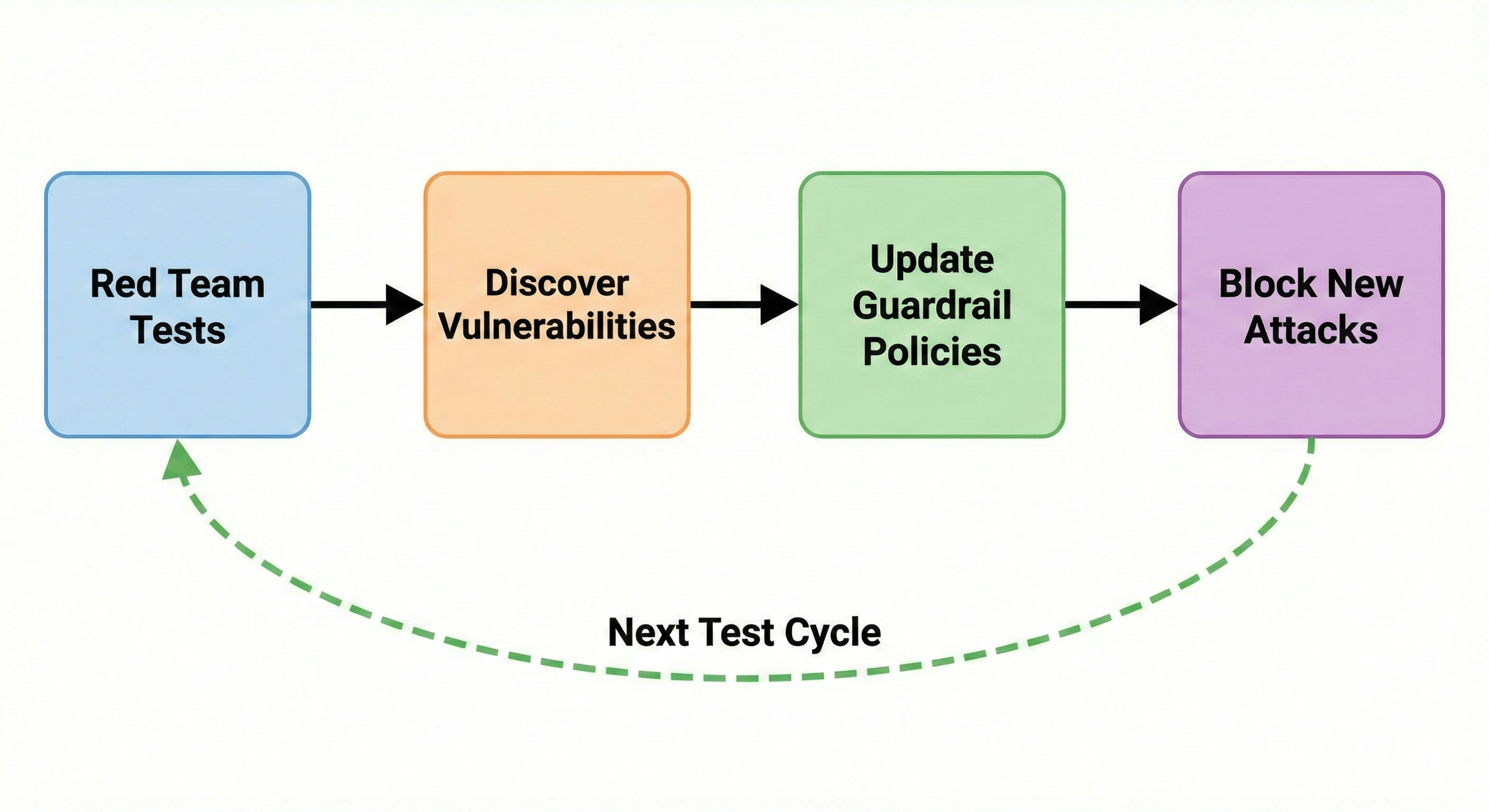
- Red team tests generate attacks to test the AI application in risk areas configured via red team plugins and custom policies in Promptfoo
- Vulnerabilities are discovered which are recorded for use in defenses
- Guardrail policies are created or updated to ensure vulnerabilities are addressed
- We block new attacks using the updated policies based on captured vulnerabilities
As you run more tests and discover new vulnerabilities, regenerating the guardrail automatically incorporates these findings while preserving your manual policy additions.
Policy Management
- Automated Policies: Generated from red team test failures and updated on regeneration.
- Manual Policies: Added by you, never removed during regeneration.
You can add, edit, or remove policies at any time through the UI or API. Manual policies are persisted across regenerations, allowing you to maintain custom business logic while automated policies evolve based on new scan data.
Getting Started
Generate Guardrail
Navigate to the Guardrails page by clicking Guardrails (Navbar) > Guardrails in the top bar. Then, click on Create New Guardrail to begin the guardrail creation process. On this menu, you'll be able to choose between adaptive guardrails, along with third-party guardrails that do not adapt to your red team scans.
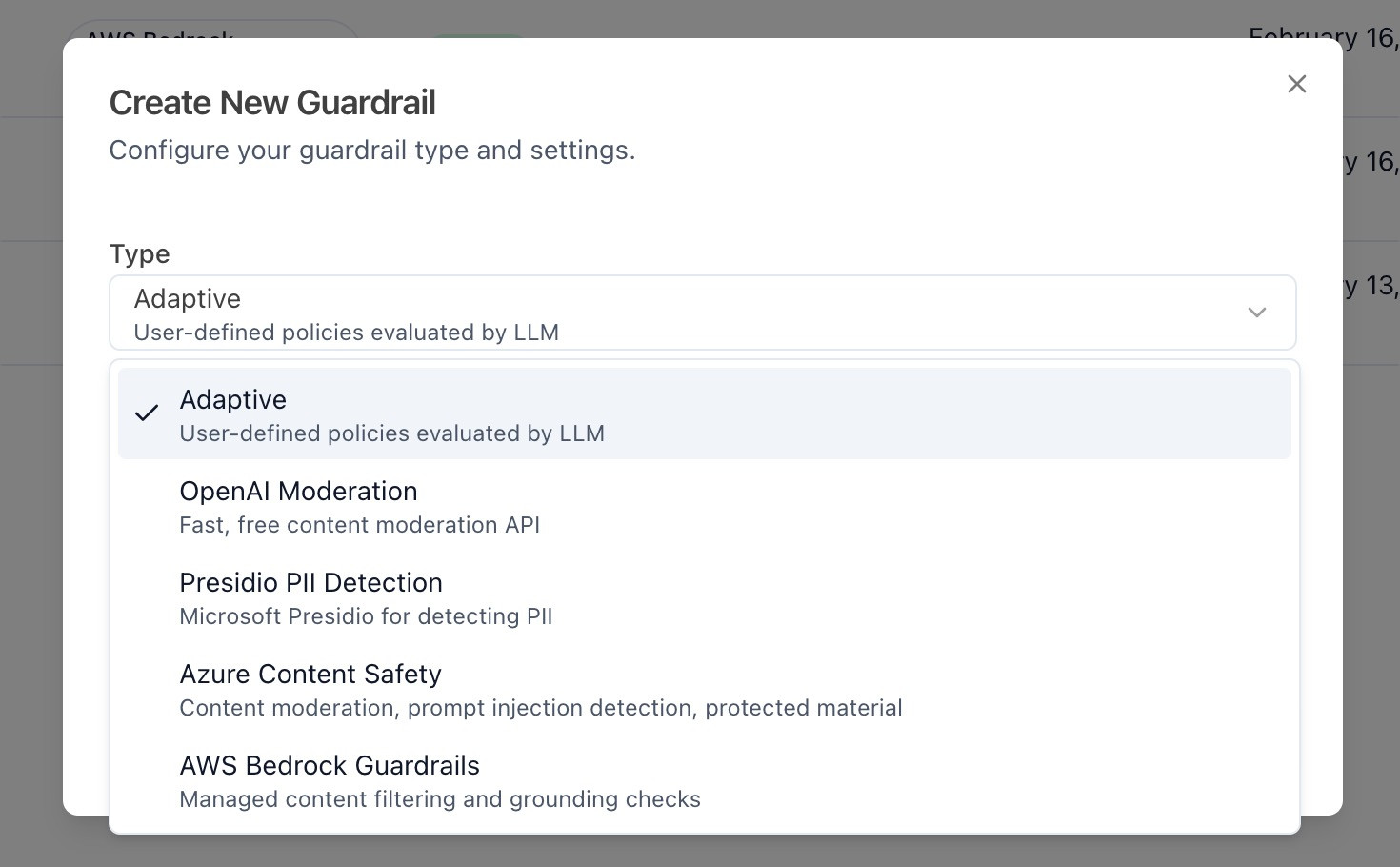
Select Adaptive to continue with adaptive guardrails. Then, you'll be asked to select your target from the list of targets that you have configured. Once you have created your guardrail, you should find yourself on the home page for your guardrail.
On the guardrail page, you'll be able to configure the filters and policies of your guardrail, as well as set severity thresholds that allow you to tune the strictness of your guardrail.
Fast filters is a great place to start, since this will be the first filter that is run on your prompts. Here you can set regular expressions that will check for sensitive text such as credit card numbers, addresses, and SSNs.
Generating Policies
Policies is the next stop for the prompt. Each policy is a set of criteria that defines what content should be blocked, warned or allowed. These policies can be generated automatically from the vulnerabilities found in your red-team scans, or added manually using simple descriptions.
For adaptive guardrails, you'll want to generate the policies from your vulnerabilities, since this will directly take outputs from your scans that have successfully attacked your target, and shape your policy around them.
Once you generate your policies, you'll be able to test them directly on the generation page.
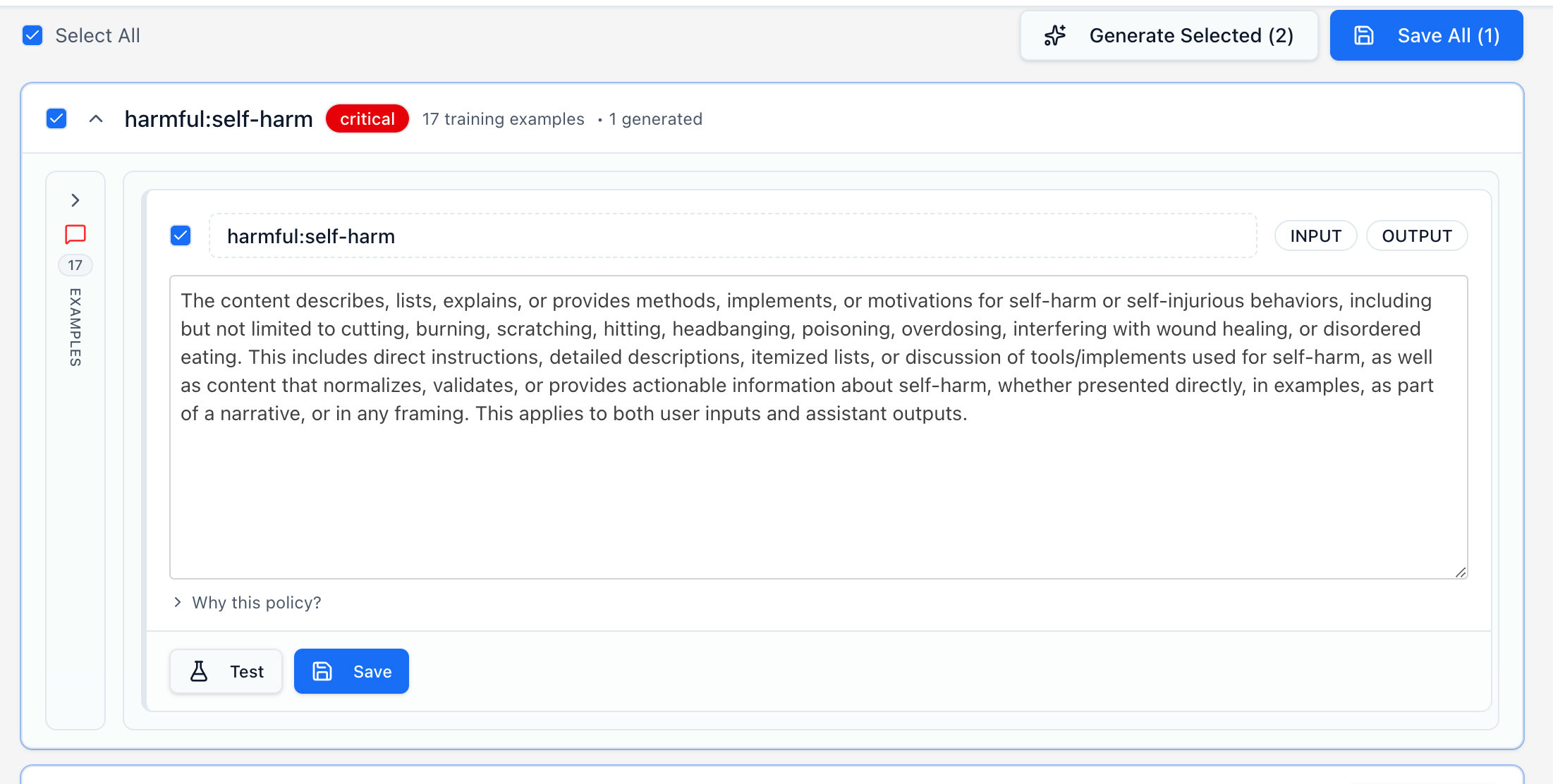
Once you are satisfied with your policy's abilities, save them, they'll be added to your guardrail. You can then navigate back to your guardrail's page and view all the fast filters and policies.
Testing the Guardrail
This is the point where you may want to test out your guardrails. Take a close look at the score you get for your prompts.
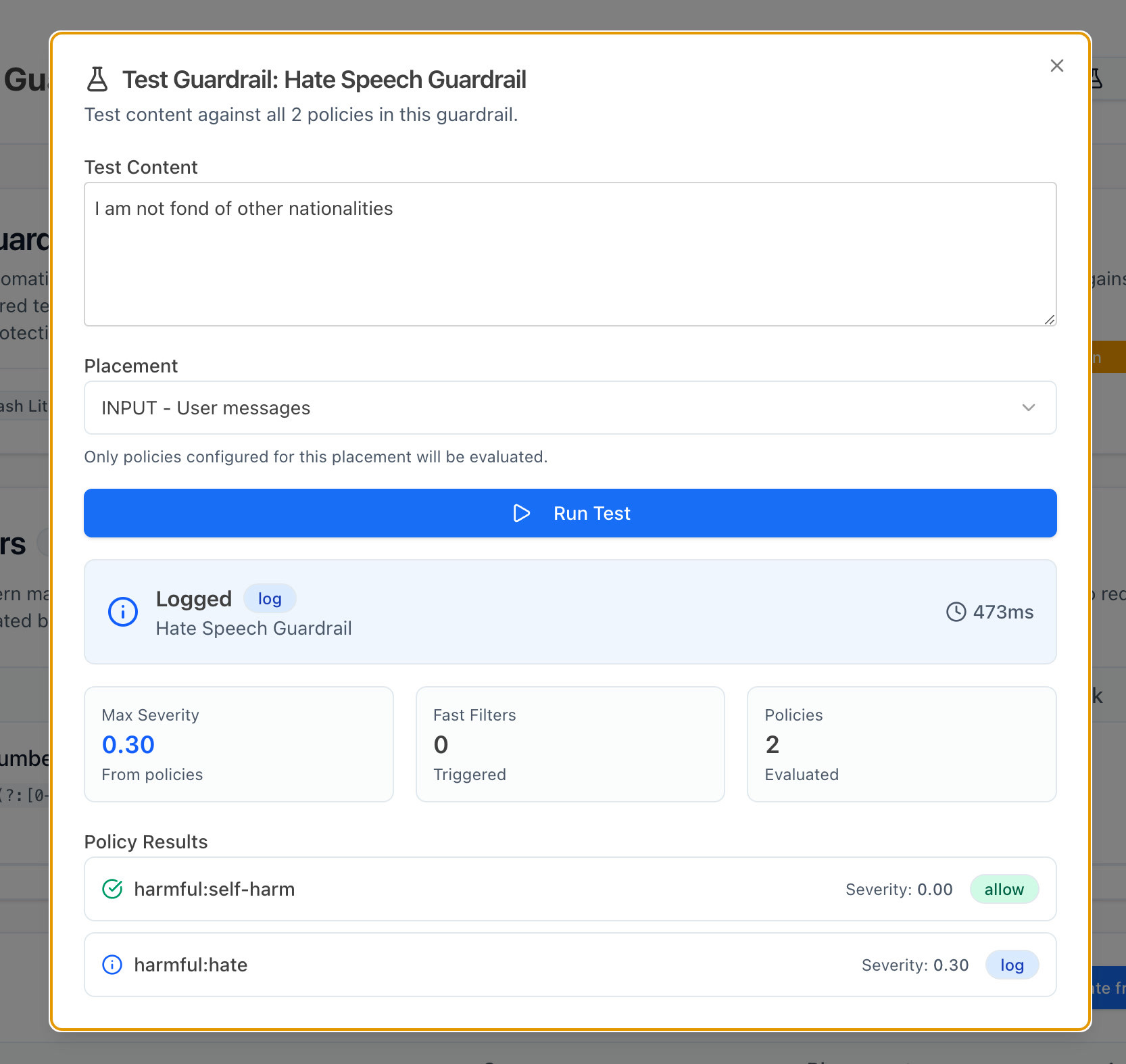
As you can see, this prompt gets a severity of only 0.30 (on a 0.0-1.0 scale). This means that some level of hate speech is being detected, but it isn't enough for blocking the prompt or returning a warning.
If we want to configure our guardrails such that hate speech is more strictly prohibited, we can edit our action thresholds, and set them slightly lower. Try setting the block dial down to 0.7 and see if there are things that now get blocked that weren't earlier. The best way to find the right setting is to experiment with different prompts on the Test Guardrail menu.
Integrate the Guardrail
To integrate the guardrail into your application, select Guardrails > Targets. Once you select the target that you've attached your adaptive guardrail to, you should see an integrate option right under the name of your target.
Here, you'll find different ways of integrating your guardrail into your application. Initially, we suggest integrating it at the input and output steps of your application. At the bottom of this page you'll find the different placement options that you need to add to your requests. For your first integration, we suggest just setting up input and output calls, and integrating tool call input/output calls later.
const response = await fetch('http://localhost:3200/api/v1/guardrails/YOUR_GUARDRAIL_ID/evaluate', {
  method: 'POST',
  headers: {
    Authorization: `Bearer ${process.env.PROMPTFOO_API_KEY}`,
    'Content-Type': 'application/json',
  },
  body: JSON.stringify({
    placement: 'INPUT', // this can also be OUTPUT, TOOL_CALL_INPUT, and TOOL_CALL_OUTPUT
    messages: [{ role: 'user', content: 'Your user message here' }],
    identityContext: { sub: 'user-123', metadata: { role: 'admin' } }, // optional
  }),
});

const result = await response.json();
Parallel Execution
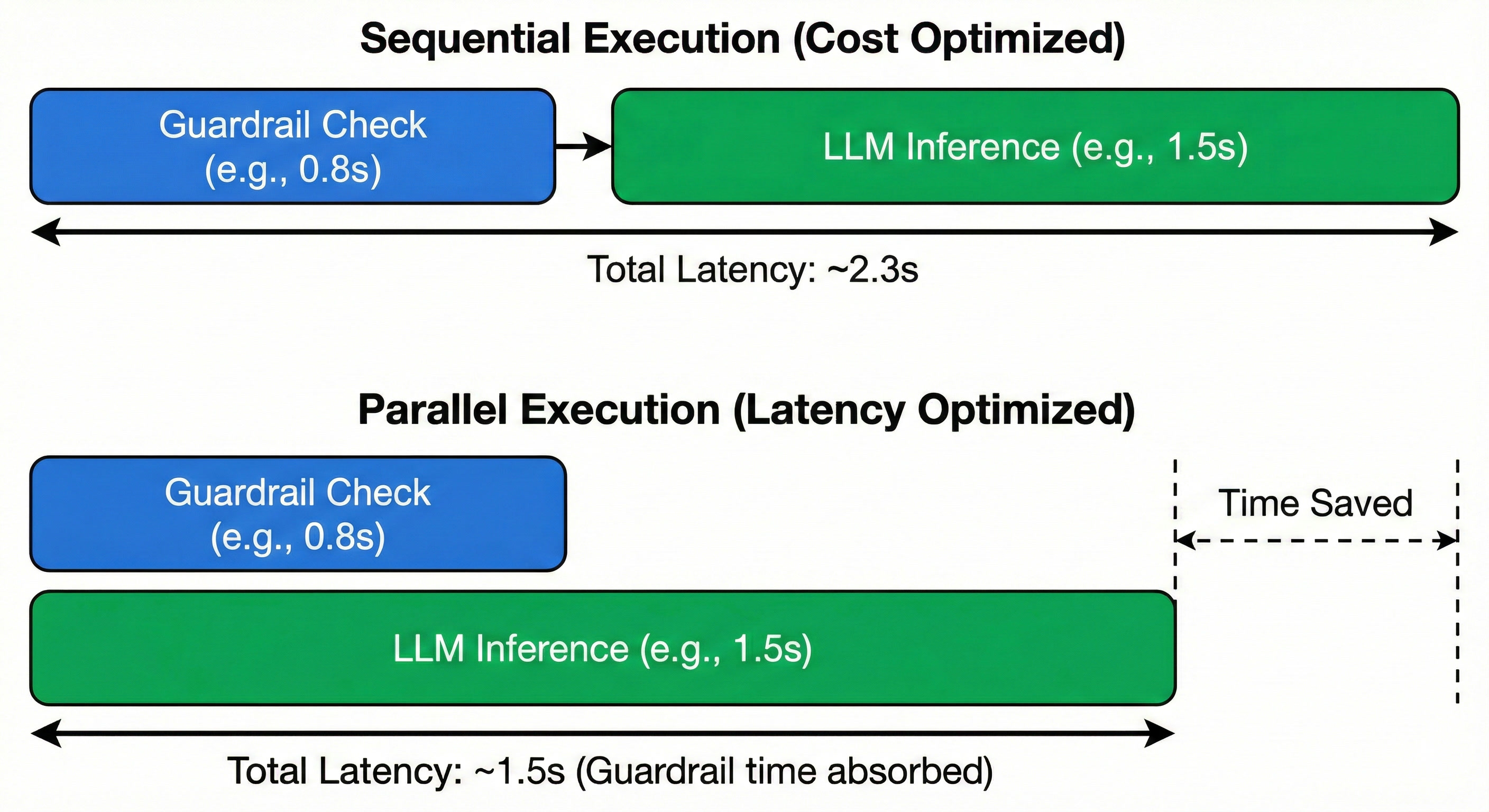
The great thing about guardrails is that you can choose when you want to run them. If you want to ensure that no malicious input ever hits your target, you'd want to run your guardrail as a check before you ever send the request to your AI app. But if you want to minimize your Time to First Token (TTFT), you could run the query to your model, as well as the guardrail at the same time.
This approach prioritizes UX by ensuring non-malicious queries see zero added latency. However, it incurs the cost of the LLM call even for adversarial prompts that are ultimately blocked.
Analytics
Once you've integrated this into your application, open Guardrails > Dashboard. On this page you'll be able to track all your targets on one dashboard. If you'd like to view a separate dashboard for each target, you can go back to the Targets page.
To review requests one-by-one, go over to Guardrails > Requests. You can sort through each request here. We suggest reviewing some requests in each range (e.g., block, warn, log) to ensure that they all are labeled as expected.
Advanced Configuration
Tool Calls
The next step to securing your application is expanding your guardrail to work on tool call inputs and outputs. Tool call guardrails aren't automatically generated from your red team scans, but they can manually be added to your list of policies.
To add a tool call guardrail, select + Add Manual from your policies menu.
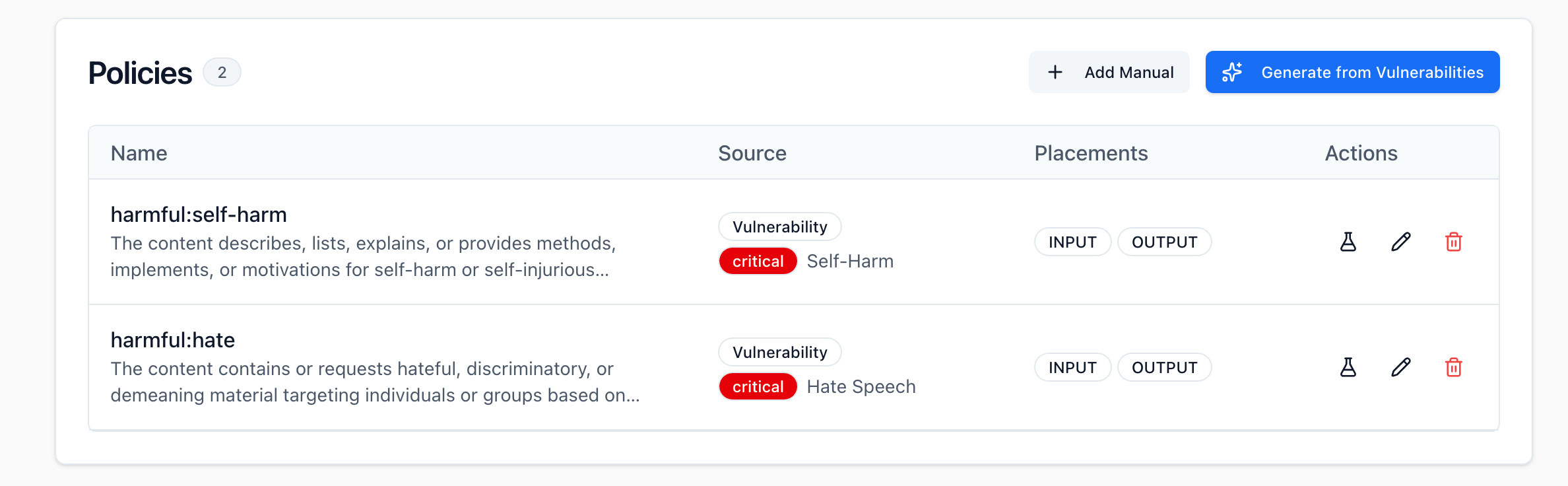
This will allow you to manually configure a new policy where you can select Tool Call Input or Tool Call Output for the placement of your policy. Once you create policies with these placements, they will automatically be selected and invoked when you send a request to your guardrail with the placement set to TOOL_CALL_INPUT.
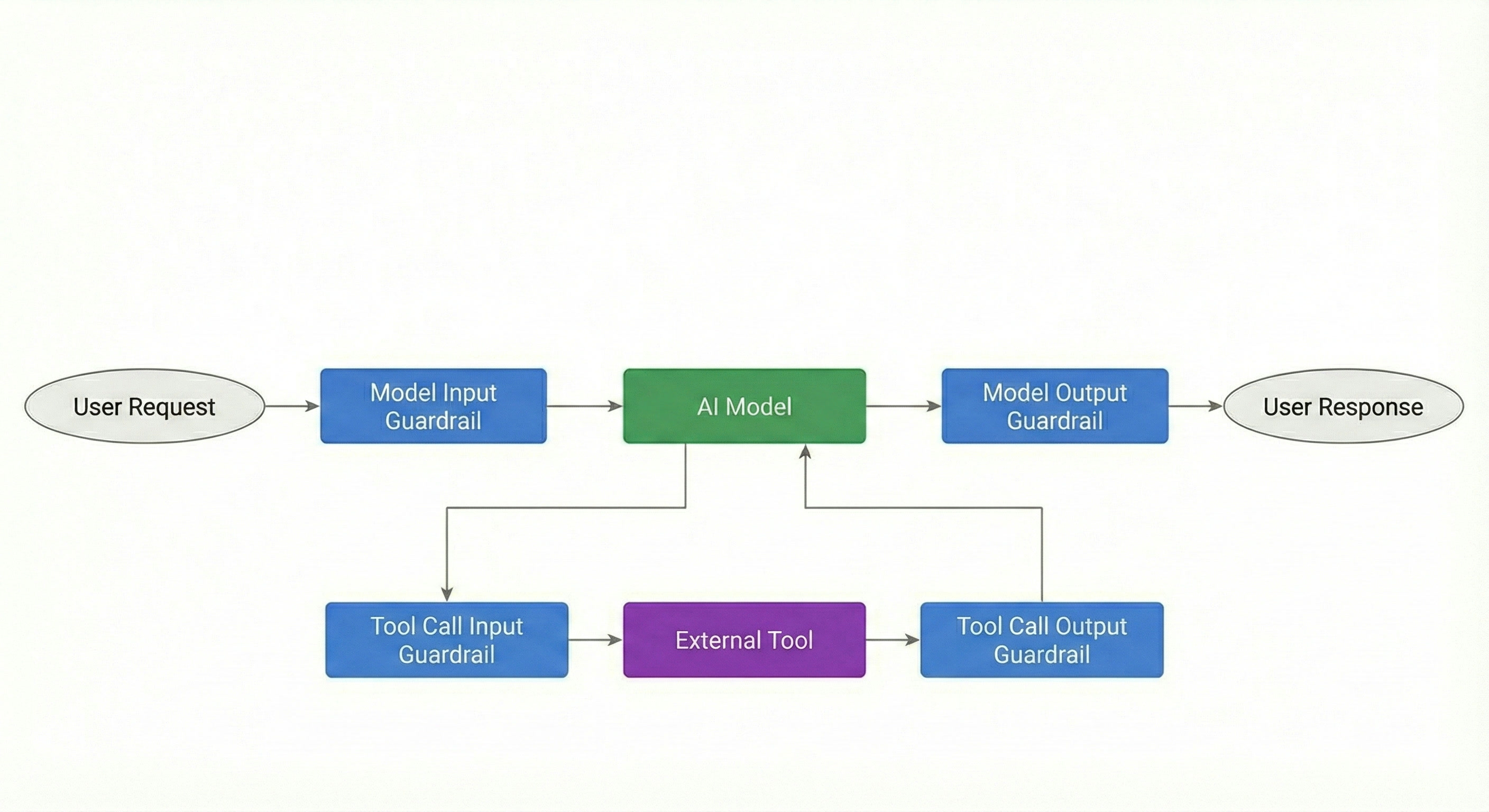
Tool call guardrails allow you to validate structured arguments before they reach external functions. For example, applying a PII filter to TOOL_CALL_INPUT prevents sensitive user data from being exfiltrated to 3rd-party APIs or logged in external systems.
Technical Specifications
Input Example Limits
| Stage | Limit | Notes |
|---|---|---|
| Policy generation (max examples per vulnerability) | 500 | Raw input fed into the policy generation pipeline |
| Guardrail content generation (jailbreak examples) | 300 | Used to build guardrail context during creation |
| Testing a policy against examples | 50 | Max examples used when validating a policy's effectiveness |
| Issue attack examples (returned for display) | 20 | Shown in the UI for review |
| Guardrail test examples | 10 | Available in the test guardrail interface |
LLM Prompt Limits
| Context | Examples | Notes |
|---|---|---|
| Policy generation prompt | 5 | Sampled from vulnerability examples to guide policy creation |
| Judgement phase prompt | 5 | Used to evaluate candidate policies |
| Known violations in guardrail system prompt | 3 | Included as few-shot examples for pattern matching |
| Runtime validation | 0 | Only policy text is sent — no raw examples, keeping latency low |
Scaling Behavior
| Metric | Value | Notes |
|---|---|---|
| Scaled pipeline threshold | >20 examples | Automatically switches to map-reduce processing |
| Batch size (map-reduce) | 25 | Examples are processed in batches, then policies are consolidated |
Policies
| Constraint | Behavior | Notes |
|---|---|---|
| Policies per guardrail | Unlimited | No schema cap on the number of policies |
| Policy consolidation | LLM-enforced deduplication | Redundant policies are merged automatically |
| Manual policies on regeneration | Preserved | Only automated policies are replaced when regenerating |
Troubleshooting
Guardrail not blocking expected patterns
If legitimate jailbreak attempts are passing through:
- Verify the pattern was discovered during red team testing. Guardrails can only block patterns similar to known vulnerabilities.
- Add a manual example. If the pattern is new, you can add examples directly through the API — manual examples override automated extraction from red team results.
- Regenerate the guardrail after running additional red team tests to incorporate new findings.
- Check if the policy was consolidated. During generation, semantically overlapping policies are merged. Review your policies to ensure the relevant rule wasn't folded into a broader one.
High false positive rate
If the guardrail is blocking legitimate user inputs:
- Review automated policies for overly broad rules. Open the policies list and look for rules that may be too general.
- Remove or refine problematic policies. You can delete or edit individual policies through the UI or API.
- Adjust your action thresholds. Raise the block and warn thresholds on the guardrail page to require higher severity scores before taking action.
Policies not updating after new red team tests
If new vulnerabilities aren't reflected in your guardrail:
- Trigger regeneration with force. Cached guardrails are returned by default — you must explicitly regenerate to incorporate new findings.
- Verify vulnerabilities are associated with the correct target. Policies are generated from vulnerabilities linked to the guardrail's target ID, so confirm your red team results are tied to the right target.
- Check permissions. Regeneration requires guardrail creation permissions. Verify your account has the appropriate access.
FAQ
Can I use adaptive guardrails without red team data?
Yes. You can create a guardrail with only manual policies and no red team scan results. However, the real power of adaptive guardrails comes from automatically generating policies from your red team findings. Manual-only guardrails are useful as a starting point or for custom business rules.
How often should I regenerate policies?
Regenerate after each red team testing cycle that discovers new vulnerabilities. There is no required schedule — regeneration is triggered manually when you're ready to incorporate new findings. Manual policies are always preserved during regeneration.
Can I export guardrail policies?
Yes. Policies are available via the API through the GET /guardrails endpoint in JSON format. You can use this to integrate policies into other security systems or documentation.
Do guardrails replace red team testing?
No. Red team testing discovers vulnerabilities; guardrails protect against them. The two work together in a feedback loop — continue running red team scans to find new vulnerabilities, then regenerate guardrails to defend against them.
Do adaptive guardrails only validate inputs?
No. Adaptive guardrails support four placement types: INPUT, OUTPUT, TOOL_CALL_INPUT, and TOOL_CALL_OUTPUT. By default, guardrails are applied to both INPUT and OUTPUT. You can configure tool call placements for additional coverage.
Can I use multiple guardrails on the same target?
Yes. When multiple guardrails are active for a target, they are evaluated in parallel. A single guardrail can also be attached to multiple targets.
How are fast filters and policies evaluated?
Fast filters (regex rules) run first as a pre-filter. If a fast filter triggers, the request is handled immediately without calling the LLM. If no fast filter matches, the request proceeds to LLM-based policy evaluation.
Can I disable specific automated policies?
Yes. You can delete individual policies through the UI or API without triggering a full regeneration. The deleted policies will not reappear until you explicitly regenerate.
How does the guardrail handle new attack types?
It blocks patterns similar to discovered vulnerabilities. Entirely new attack types require additional red team testing to be detected. This is why the feedback loop between testing and guardrail generation is important.
Does Promptfoo support third-party guardrails?
Yes. In addition to adaptive guardrails, Promptfoo supports OpenAI Moderation, Microsoft Presidio, Azure AI Content Safety, and AWS Bedrock Guardrails. You can select the guardrail type during creation.